Previous |
Next
using lists
In some cases, you want to execute the same command multiple times on different coordinates. For instance if you want to light multiple rows on
the TagTiles board to make the pattern shown below. You would have to reuse the
drawRow macro repeatedly:
drawRow 1 red; drawRow 3 red... etcetera.
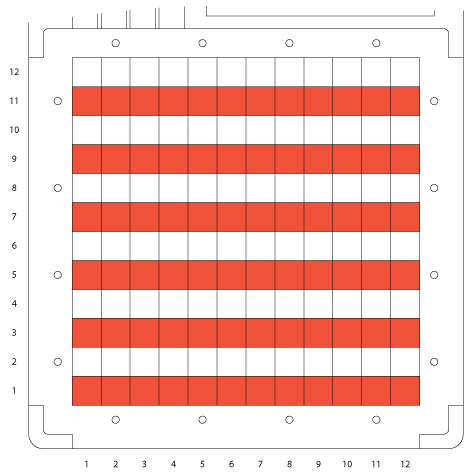
In this case it would be easier to write the following macro.
multipleRows = (
  sequence {drawRow y red : y <- {1, 3, 5, 7, 9, 11}}
)
In the macro
multipleRows, we have created a
list. Between the curly brackets we have a list with several items. On the left
side of the colon we have the macro
drawRow without filling in the y coordinate and the color set to
red.
On the right side of the colon we have a list for all the y coordinates we want filled in the
drawRow macro. This creates a list
of 6 commands, each command defines a red row of lights on a different y-coordinate (1, 3, 5, 7, 9, and 11).
Finally, by writing
sequence we have sequentialized all the commands in the list. This list of commands would be the same as
(drawRow 1 red; drawRow 3 red; drawRow 5 red; drawRow 7 red; drawRow 9 red; drawRow 11 red)
Besides sequentializing all commands, you can also parallelize them by writing
parallelize before the list of items. This executes all
commands in the list in parallel.
If you, for example, look at how the macro
drawRow is built up in the
tagtiles.esp library, you will notice it also makes use of
a list.
drawRow y c = (sequence {(drawCell x y c) : x <- {1..12} })
drawRow macro also makes a list of commands. It executes the macro
drawCell 12 times, defining a cell
on the same row for each x-coordinate from 1 to 12.
{1..12} creates a list from 1 up to 12 by using
.. between both numbers.
Using the
drawRow macro from the
tagtiles.esp library, we can make the pattern on the the image above even easier by first making a macro that contains the list as a parameter. We will name this macro
drawRows
drawRows lst c = (
  sequence {drawRow y c : y <- lst}
)
Now we have a macro that uses the parameters list and color. If we want to make the pattern from the image we can simply fill in the parameters
as follows.
multipleRows2 = (
  drawRows {1, 3, 5, 7, 9, 11} red
)
The TagTiles board will light rows using the list of y coordinates 1, 3, 5, 7, 9, and 11 in the color red.
Another macro from the
tagtiles.esp library that makes use of lists is
drawRect.
drawRect x1 y1 x2 y2 c = (sequence {(drawCell x y c) : x <- {x1..x2}, y <- {y1..y2}})
This macro uses a list of both x and y coordinates. If we fill in x1=1, y1=1, x2=4 and y2=4, it would create a list of 12 commands drawing all
the possible combinations of x 1 to 4 and y 1 to 4, thus creating a rectangle of cells.
Try making a pattern on the TagTiles board with vertical columns using lists and the
drawCol macro in the same way we have done in this
section. Also try using lists in combinations with other macros, for example
endureSounds would make it possible to play a list of sounds.
Previous |
Next