Previous |
Next
A first application
Let’s start programming in ESPranto. By doing small exercises we will work step by step on a drawing application.
We will start by making a program that lights a cell on the TagTiles board.
Save this code somewhere on your harddrive and open it in your text-editor.
What you see here is a simple program written in ESPranto. This is all you need to write to light up
Cell (3,4). As an exercise, try to compile the code and execute it. If all goes well, you will see that
Cell (3,4) indeed lights up in yellow.
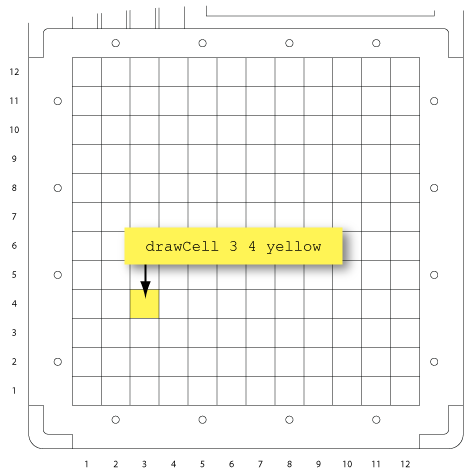
One specific line of text in this program takes care of lighting up the cell:
drawShape (Cell (3,4)) yellow
Things that make the TagTiles board do something (such as lighting up cells), are called Commands. Hence, the above line is a Command.
The Command starts with the word drawShape. In order to specify how to draw the shape, you have to provide some more information, namely:
- Which shape to draw
- In which color to draw
That information is given after the word
drawShape: the shape we want to draw is a single
Cell with coordinate
(3,4), and we want that shape to be
yellow. Notice how the different pieces of information are seperated by spaces. Brackets are used as well, and we will explain about those later.
Macros
In ESPranto, things like
drawShape are called macros. Most macros require some extra information. The bits of information that you pass are called
parameters. For instance,
drawShape is a macro that requires two parameters; namely the shape to draw and the color to use. If you pass those two parameters, you get a command that draws the given shape on the board, in the given color.
Likewise, Cell is a macro. It takes one parameter: the coordinate of the intended cell.
Brackets
In ESPranto, you write brackets to indicate which parameter belongs to which macro. If we, mistakenly, would have written the command as
drawShape Cell (3,4) yellow
instead of
drawShape (Cell (3,4)) yellow
the compiler would have thought that we intend to pass 3 parameters to
drawShape. This would be a programming mistake and the compiler would not be able to comprehend our intentions. Therefore, we have to use brackets: to indicate that the coordinate
(3,4) is a parameter of
Cell, and not of
drawShape.
Capitalization
If a macro name consists of multiple words, we indicate where each word start by using capitals. For instance, a macro could be called
drawAShapeAndColorItInYellow (although this particular macro does not exist).
Further, you may have noticed that the macro
drawCell starts with a lowercase
d, whereas
Cell starts with an uppercase C. For the time being, this difference is not really important. Just remember that some macros start with an lowercase letter, and others with an uppercase letter.
Excersize
-
Try to alter the program a little. For instance, try changing the color of the shape, e.g. into blue, or red
- Also try changing the shape, for instance into a rectangle, by typing drawShape (Rect (3,4) (2,2)) yellow
- Contrary to the Cell macro, the Rect macro requires two parameters. Can you guess why?
Previous |
Next